Top 10 Free Employee Monitoring Software in 2026
This guide compares ten employee monitoring tools with free plans or free trials, judged on tracking coverage, productivity insights, and practical value. Each entry includes a concise summary, who it is best for, pros and cons, and key highlights to speed up your decision.
Quick take
Most tools track apps, websites, and time, but the biggest differences are cost model, whether the free tier is actually usable, and how invasive the monitoring feels to staff. For a single workstation or a small team, a one-time local tool often beats a per-seat subscription — always tell employees they are being monitored and follow local law.
Best Free Keylogger
Our pick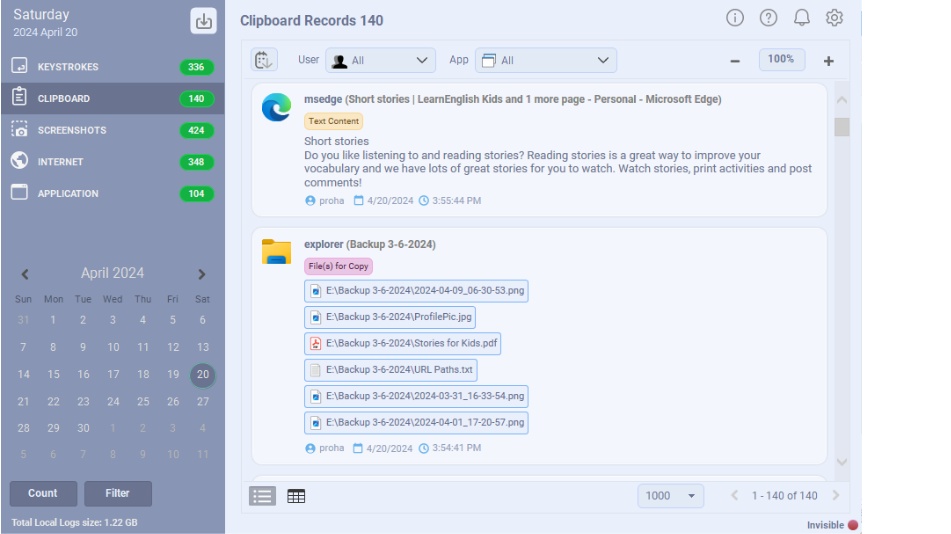
Best Free Keylogger pairs detailed activity tracking with practical controls such as app restrictions and web filtering, wrapped in a report viewer that is genuinely easy to read.
For a small business or a single workstation, it covers the essentials without a per-seat subscription: keystrokes, applications, websites, and clipboard, delivered as readable reports rather than raw dumps. Smart Read reconstructs typed text into sentences, and you can filter records by application, date, user, or text so a busy shift is quick to review. Reports can be sent by Email, FTP, LAN, or USB, and one-click web and app blocking lets you enforce simple acceptable-use rules. The free Lite tier handles everyday monitoring; Pro unlocks unlimited screenshots and full stealth as a one-time purchase.
Best for: Small teams and single workstations that want capable local monitoring without a recurring per-user bill.
Pros
- No per-seat subscription — free Lite tier, one-time Pro upgrade
- Smart Read turns keystrokes into readable text
- Filtering by app, date, user, and text
- One-click web and application blocking
Cons
- Windows only
- No cloud dashboard for large distributed teams
- Local, private monitoring
- Filtering by app/date/user/text
- One-click web and app restrictions
ActivTrak
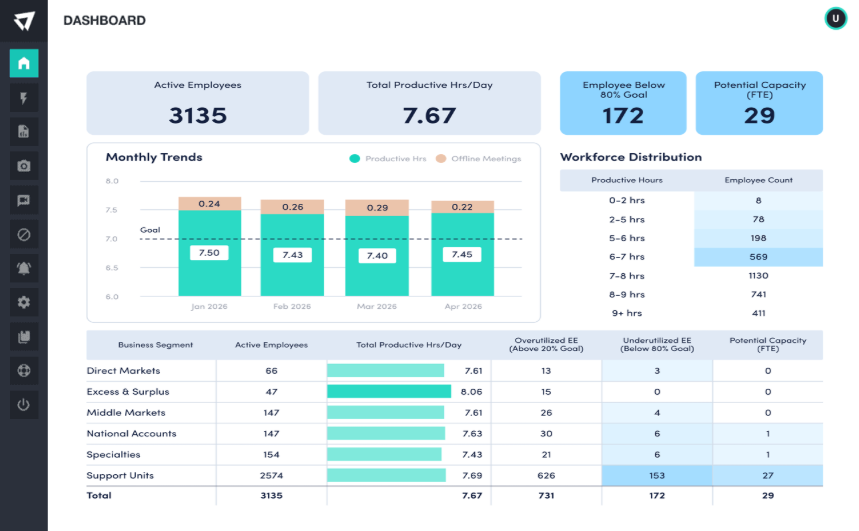
ActivTrak is a productivity-analytics platform with a genuinely useful free tier for up to three users, focused on insights rather than raw surveillance.
Instead of only logging activity, ActivTrak classifies applications and websites as productive or unproductive and rolls them into dashboards, benchmarks, and team reports. The free plan covers up to three users with limited data history, which is enough to evaluate the workflow. It runs agents on Windows, macOS, and Chrome OS and syncs everything to a cloud console for remote review. Advanced analytics, longer retention, and alarms move to the paid Essentials and Professional tiers.
Best for: Managers who want productivity insights and dashboards more than keystroke-level logs.
Pros
- Free plan for up to 3 users
- Strong productivity dashboards and benchmarks
- Cross-platform cloud agents
Cons
- Free data history is limited
- Advanced analytics and alarms are paid
- Productivity classification
- Team benchmarks and reports
- Cloud dashboard access
Hubstaff
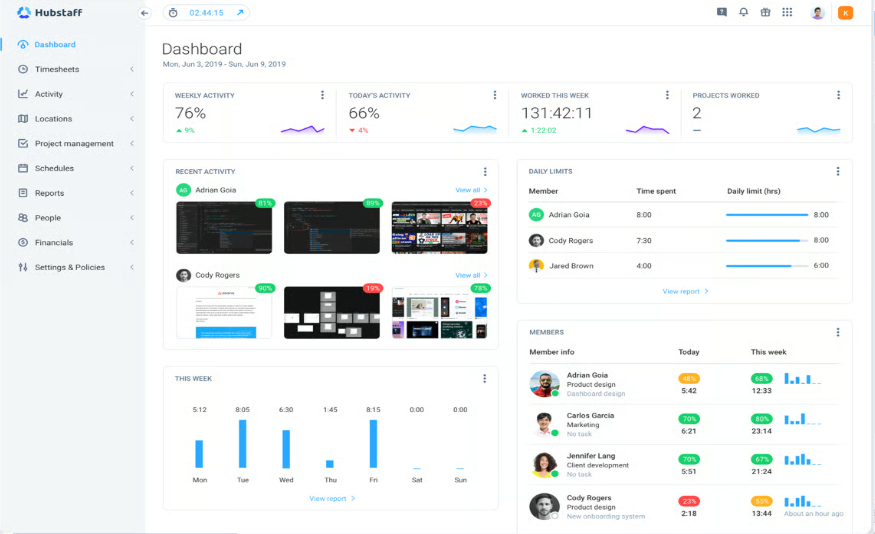
Hubstaff combines time tracking with light monitoring — screenshots, activity levels, and GPS — and offers a free tier for solo users.
Its core is time tracking tied to projects and payroll, with optional screenshots and app/URL tracking layered on top. The free plan is limited to a single user but includes time tracking and basic activity monitoring, which suits freelancers and very small teams testing the workflow. Mobile apps with GPS make it a strong pick for field and remote staff, and it integrates with project-management and invoicing tools. Screenshots, deeper monitoring, and team features sit in the paid plans.
Best for: Remote and field teams that need time tracking with light activity monitoring.
Pros
- Free tier for a single user
- Time tracking tied to projects and payroll
- Mobile apps with GPS tracking
Cons
- Free plan is single-user only
- Screenshots and team features are paid
- Time tracking + activity levels
- GPS and mobile tracking
- Payroll and project integrations
Time Doctor
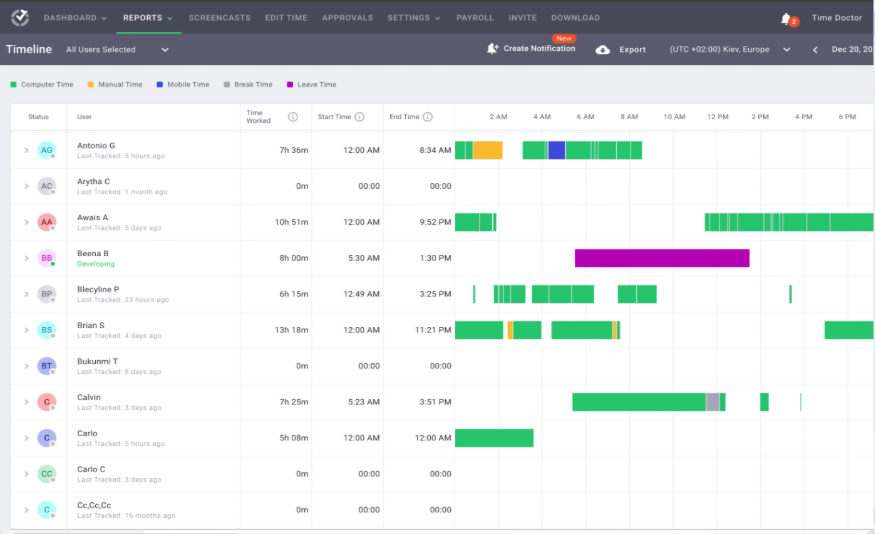
Time Doctor focuses on detailed time and productivity tracking, with optional screenshots, website/app logs, and distraction alerts.
It records time spent per task and project, tracks the applications and sites used, and can capture periodic screenshots for verification. Distraction pop-ups nudge workers back on task, and detailed timesheets feed payroll and client billing. There is no permanent free plan — you evaluate it through a 14-day trial before moving to a paid tier — but the reporting depth is a step up from simple timers. It integrates widely with project-management and payroll platforms.
Best for: Agencies and services teams that bill by time and want detailed productivity reports.
Pros
- Detailed per-task time and productivity reports
- Optional screenshots and distraction alerts
- Wide integrations for payroll and billing
Cons
- No permanent free plan (trial only)
- Screenshots can feel intrusive to staff
- Task and project time tracking
- Distraction alerts
- Detailed productivity reports
DeskTime
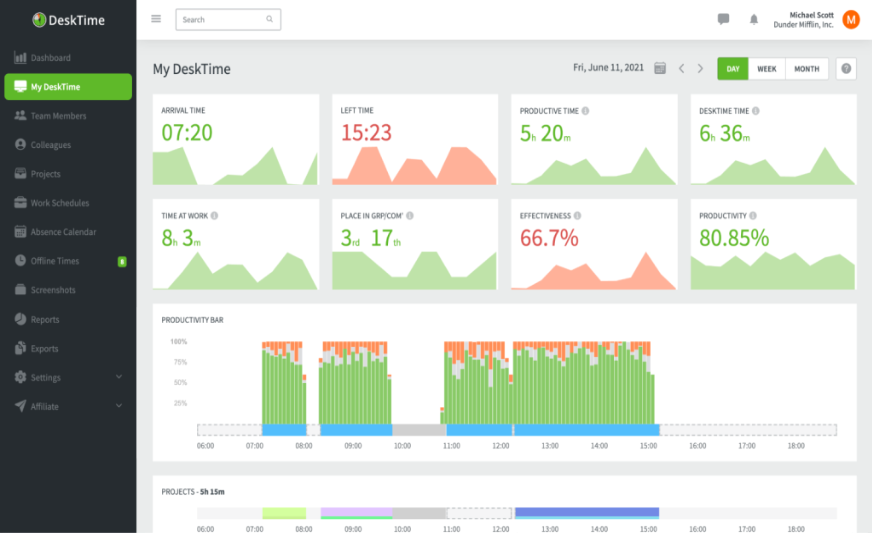
DeskTime offers automatic time tracking with a free Lite plan for a single user and a clean productivity-focused interface.
It tracks active and idle time automatically and labels applications and URLs as productive, unproductive, or neutral. The free Lite plan gives one user automatic time tracking without screenshots, which is a genuinely usable starting point for a solo professional. Paid tiers add screenshots, project tracking, absence calendars, and team reporting. The design leans toward productivity measurement rather than heavy surveillance, which many staff find less invasive.
Best for: Solo professionals and small teams wanting automatic, low-friction time tracking.
Pros
- Free Lite plan for one user
- Automatic productivity classification
- Less invasive than screenshot-heavy tools
Cons
- Free plan lacks screenshots and projects
- Team features require an upgrade
- Automatic time tracking
- Productivity labeling
- Absence and project add-ons
Insightful
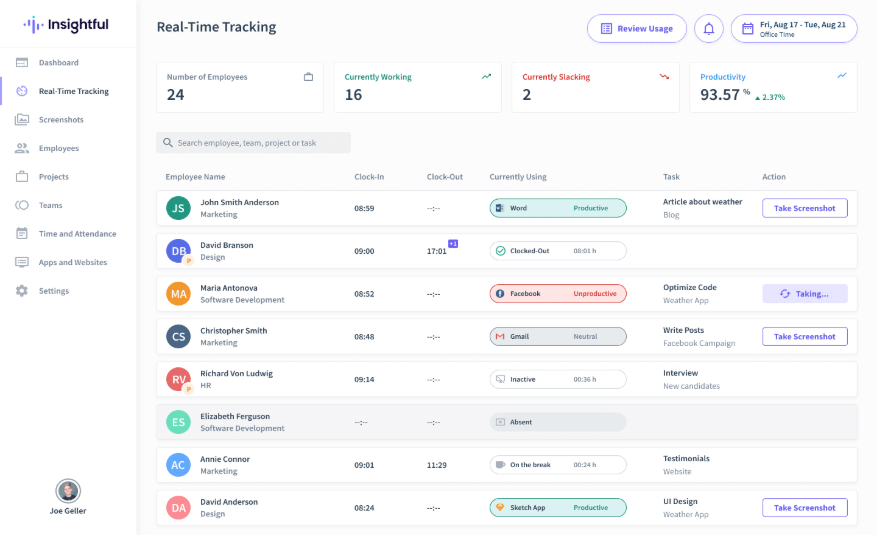
Insightful (formerly Workpuls) is a workforce-analytics platform built to scale, with time tracking, productivity trends, and stealth or visible agents.
It blends automatic time tracking with app and website usage, productivity scoring, and project time allocation, presented through an analytics-heavy dashboard. It is designed for larger, distributed workforces and offers both visible and stealth monitoring modes. There is a free trial rather than a permanent free tier, so it is best considered when you are ready to commit to a paid plan. Screenshots and deeper analytics scale with the tier you choose.
Best for: Growing and enterprise teams that need scalable workforce analytics.
Pros
- Scales to large distributed teams
- Productivity scoring and project allocation
- Visible or stealth agent modes
Cons
- Trial only, no permanent free plan
- Analytics depth tied to higher tiers
- Workforce analytics dashboard
- Time and project allocation
- Visible or stealth agents
Teramind
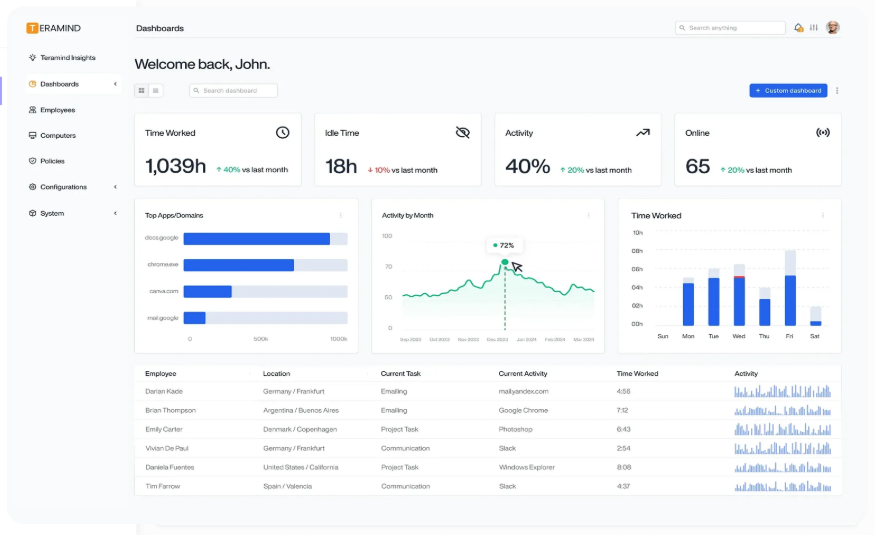
Teramind is a heavyweight user-activity-monitoring and insider-threat platform with deep rule-based controls and data-loss prevention.
Beyond standard monitoring, Teramind adds behavior rules, real-time alerts, and DLP policies that can warn, block, or lock a session when sensitive actions occur. It records screens, keystrokes, files, and communications, and supports cloud or on-premise deployment for compliance-sensitive organizations. It is powerful but complex, with a five-seat minimum and higher per-seat cost, so it fits security-focused enterprises more than small teams. A free trial lets you evaluate before committing.
Best for: Security- and compliance-focused organizations needing insider-threat controls.
Pros
- Rule-based alerts and data-loss prevention
- Cloud or on-premise deployment
- Deep session recording and forensics
Cons
- Higher cost with a 5-seat minimum
- Complex to configure; overkill for small teams
- Insider-threat detection
- DLP and behavior rules
- Cloud or on-premise
Kickidler
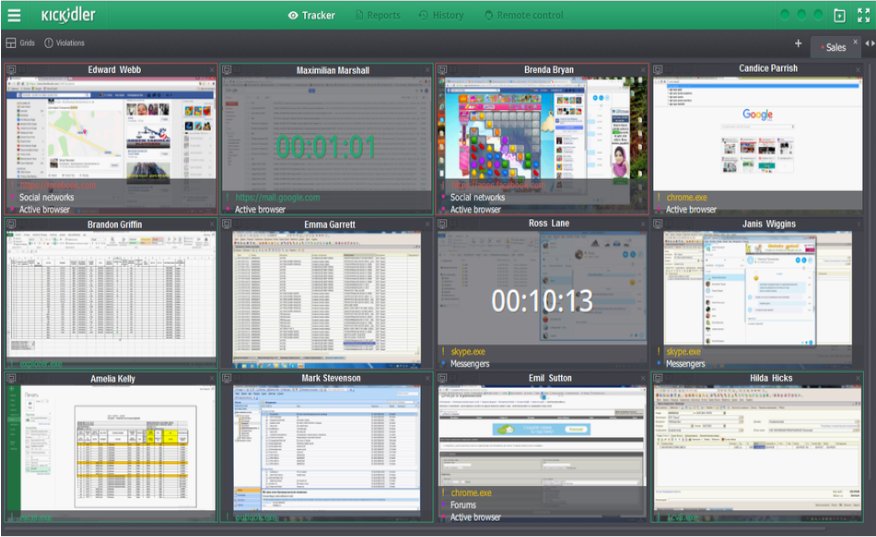
Kickidler specializes in real-time screen monitoring and recording, with a grid view of live desktops and productivity analytics.
Its signature feature is live, simultaneous viewing of many screens in a single grid, backed by continuous video recording you can scrub through later. It adds time tracking, productivity analytics, and violation alerts for policy breaches. Deployment supports Windows, macOS, and Linux. There is no permanent free plan, but a trial is available; licensing is per seat, and the video-heavy approach means storage and bandwidth are worth planning for.
Best for: Operations and support teams that value live screen visibility and recordings.
Pros
- Live multi-screen grid view
- Continuous screen recording
- Cross-platform including Linux
Cons
- Video recording is storage-heavy
- No permanent free plan
- Real-time screen viewing
- Screen video recording
- Violation alerts
CleverControl
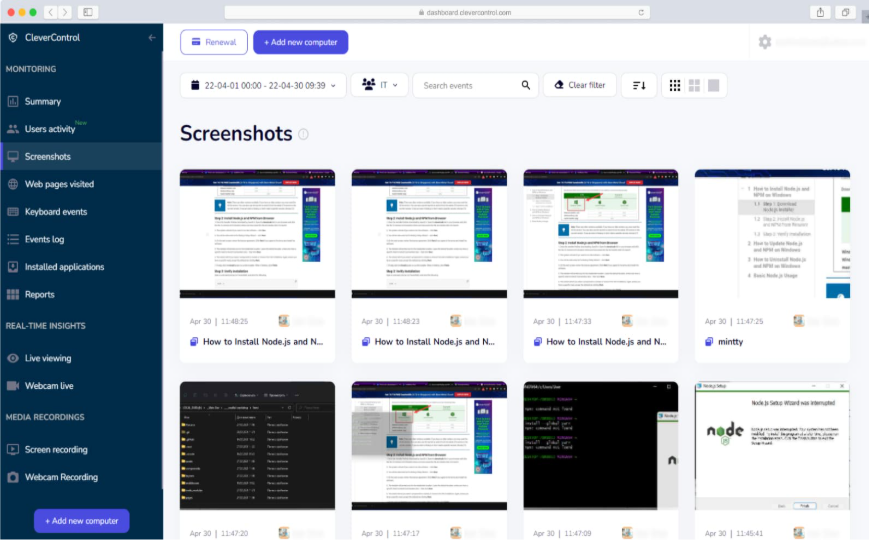
CleverControl provides cloud-based monitoring with a free single-computer plan, live screen view, and AI-assisted productivity scoring.
It captures keystrokes, screenshots, app and website use, and offers a live view of the monitored screen through an online account. The free plan covers a single computer with core features, making it easy to trial on one machine before scaling. Paid cloud plans add more computers, automatic screen recording, and AI-based productivity scoring. As with any cloud logger, routing activity through a third-party account is a privacy trade-off worth weighing.
Best for: Small businesses that want a free single-PC start with an easy cloud upgrade path.
Pros
- Free plan for one computer
- Live screen view and recording
- AI-based productivity scoring on paid tiers
Cons
- Free plan limited to one PC
- Cloud viewing raises privacy considerations
- Cloud monitoring account
- Live screen view
- AI productivity scoring
Spyrix Employee Monitoring
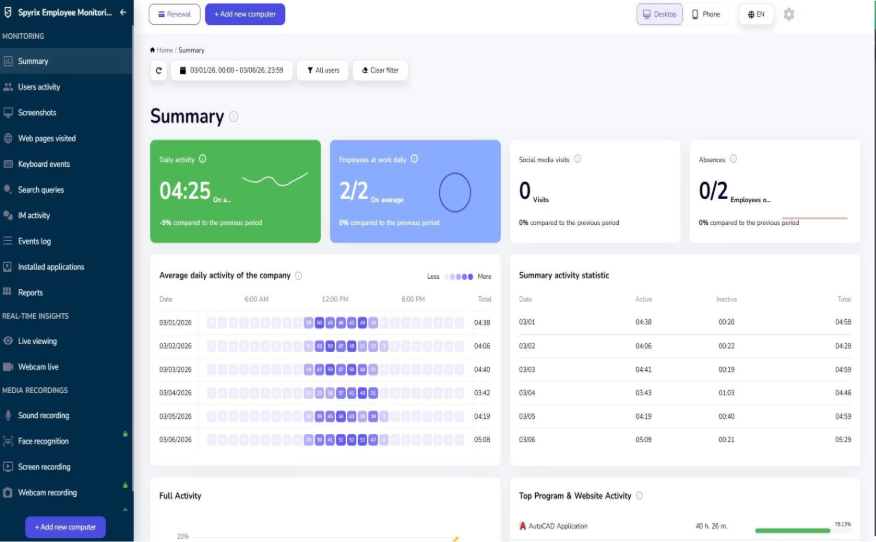
Spyrix offers a free keylogger edition and paid employee-monitoring plans, with a notable live-view dashboard even on the free tier.
The free Spyrix Free Keylogger streams recent activity to an online dashboard so you can check in remotely — something most free competitors reserve for paid tiers — and handles keystroke and screenshot logging reliably. The dedicated employee-monitoring plans add centralized management, more devices, social-media and webcam capture, and longer retention. Automated delivery and advanced capture are paid, and cloud viewing means weighing the privacy of routing data through a third-party account.
Best for: Users who want free web-based visibility with a clear upgrade path to team plans.
Pros
- Live view via web dashboard on the free edition
- Reliable keystroke and screenshot capture
- Clear upgrade path to employee plans
Cons
- Delivery and advanced capture are paid
- Cloud viewing raises privacy considerations
- Free live-view dashboard
- Keystroke and screenshot tracking
- Scalable employee plans
Explore Best Free Keylogger
Capable monitoring without a per-seat subscription
Need to monitor a single workstation or a small team without a recurring bill? Start with Best Free Keylogger and compare it side-by-side against the tools in this list.
Keep reading
All posts Setup
SetupHow to install Best Free Keylogger
Install Best Free Keylogger correctly, from setup to your first login.
Read post Roundup
Top 10 free keylogger software
A quick comparison of free options, strengths, and trade-offs.
Read post Roundup
Top 10 Free Parental Control
A quick comparison of free parental control tools, strengths, and trade-offs.
Read post