bestxsoftware logo
EN
EN - EnglishES - EspañolDE - DeutschRU - PусскийPL - Polski
  • Home
  • Features
  • Buy now
  • Support
  • Download
  • Blog
  •  Home
  • Support
  • Documentation
  • Unhide

Getting Started

  • Installation

  • Unhide

  • Login

  • User Interface

  • Upgrade To Pro

General Settings

  • Security

  • Remove Logs

  • Uninstall

  • Advanced

Monitoring Settings

  • Start/Stop Monitoring

  • Schedule Monitoring

  • Limit Monitoring

  • Screenshot Settings

Delivery Settings

  • Delivery Methods

  • Email Delivery

  • LAN Delivery

  • FTP Delivery

  • USB Delivery

Reports

  • Load Reports

  • Import Reports

  • View Reports

  • Filter Reports

Parental Controls

  • Web Filtering & Blocking

  • Application Blocking

  • Time Limiting

  • Exclusions

Unhide

You can use either of the following to Unhide Best Free Keylogger user interface.

  1. Unhide Hotkey:

    Default: Ctrl + Alt + Shift + K

    Path to Setting: Settings > Security: Unhide Hotkey

    Method: Press all the keys in the above key combination together.

  2. Unhide Keyword:

    Default: unhide

    Path to Setting: Settings > Security: Unhide Keyword

    Method: Type in the above keyword in the Run dialog box. Press + R to open Run dialog box on Windows
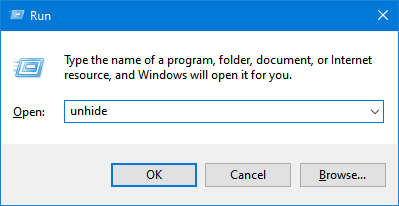
    Documentation - Unhide Keyword

Explore

  • Home
  • Features
  • Buy now
  • Support
  • Download

Support

  • FAQs
  • Documentation
  • Uninstaller
  • Contact Us
  • Blog
bestxsoftware Logo

Bestxsoftware


© 2012 - 2026 All Rights Reserved
Privacy Policy